Note
Go to the end to download the full example code.
Magnetic rose
The method pygmt.Figure.magnetic_rose can be used to add a magnetic rose to a
map. This example shows how such a magnetic rose can be customized.
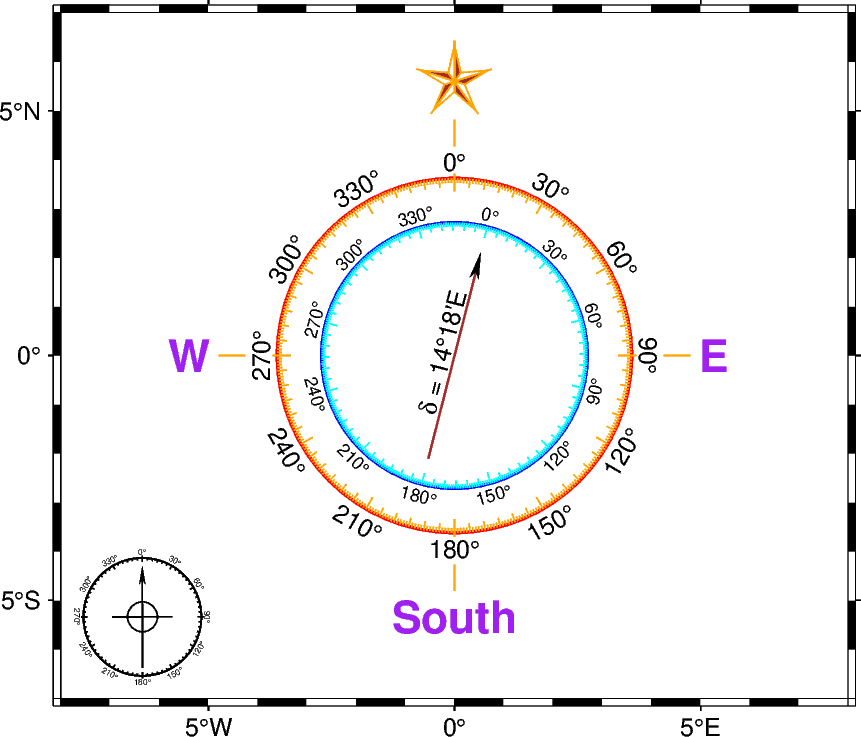
import pygmt

fig = pygmt.Figure()
fig.basemap(region=[-8, 8, -7, 7], projection="M10c", frame=True)

# Add a magnetic rose
# By default, it's placed in the lower left corner
fig.magnetic_rose()

# Add a magnetic rose with several adjustments
with pygmt.config(
    # Pen used for the ticks on the outer circle and the outline of the North star
    MAP_TICK_PEN_SECONDARY="orange",
    # Pen used for the ticks related to the inner circle
    MAP_TICK_PEN_PRIMARY="cyan",
    # Pen used for the stem of the declination arrow and the fill of the North star
    MAP_DEFAULT_PEN="brown",
    # Font used for the labels for the geographic directions
    FONT_TITLE="purple",
):
    fig.magnetic_rose(
        position="MC",  # placed at MiddleCenter
        width=4.5,  # width of the rose
        # If a declination value is given, an arrow showing the declination is plotted
        # instead of the simple North arrow
        declination=14.3,
        # Adjust the label added to the declination arrow
        declination_label="14.3 N°E",
        # Add labels for the geographic directions. Use a * to get a North star and
        # "" to skip a label
        labels=["W", "E", "South", "*"],
        # Draw an outer circle with the provided pen
        outer_pen="1p,red",
        # Draw an inner circle with the provided pen
        inner_pen="1p,blue",
    )

fig.show()
Total running time of the script: (0 minutes 0.183 seconds)